
I noticed a small green dot next to Bitmoji and started overthinking what it means? Fair enough. It’s one of those little Snapchat features that looks simple but confuses people more than it should. Here’s the actual explanation.
The Short Answer
Green dot is a Snapchat Activity Indicator. It shows up next to a friend’s Bitmoji or profile picture when they have been active on the app recently.
What it doesn’t mean is that they’re staring at their phone right this second. It’s not a live tracker. Think of it more as a recent activity signal. They were on Snapchat not long ago. Could be a minute, could be a few minutes. The dot sticks around briefly after someone closes the app before it fades out.
Where Does the Green Dot Show Up?
It is not just in one place. You will spot it in a few different spots across the app.
- Chat screen:Next to a friend’s Bitmoji in your conversations list. The most common place you’ll see it.
- Stories page:Can appear next to a friend’s story thumbnail to show they’ve been recently active.
- Snap Map:Sometimes visible near a friend’s location marker when they’ve recently used the app.
- Quick Add page:Also shows up next to suggested friend profiles. Snapchat added this to help people connect with others who are currently active.
Does It Mean They’re Online Right Now?
Not exactly. This is the bit that trips people up the most.
Snapchat doesn’t work like WhatsApp or iMessage where you get a live online or last seen status. The green dot is more of a soft signal. Someone was active recently. The app doesn’t refresh in real time with surgical accuracy so there’s usually a small delay involved.
If someone closes Snapchat the dot can hang around for a few minutes before disappearing. So seeing the green dot doesn’t confirm they’re currently in the app. It just means they were in it not long ago.
It also won’t show if Snapchat is just running in the background on someone’s phone without them actively using it. Passive background activity doesn’t trigger it.
Who Can See Your Green Dot?
Only mutual friends. Strangers searching for your profile or people who have not added you back, would not see your activity indicator. It is limited to people you’re already connected with on Snapchat.
So if you’re friends with someone on the app they can potentially see when you’ve been recently active. And you can see the same for them. That’s the exchange.
How to Turn off the Green Dot
If you’d rather people not know when you’ve been on the app you can switch it off. Takes about thirty seconds.
- Open Snapchat and tap your profile icon in the top left.

- Tap the gear icon to open Settings.

- Scroll down to Privacy Controls.
- Tap Activity Indicator.
- Turn it off.
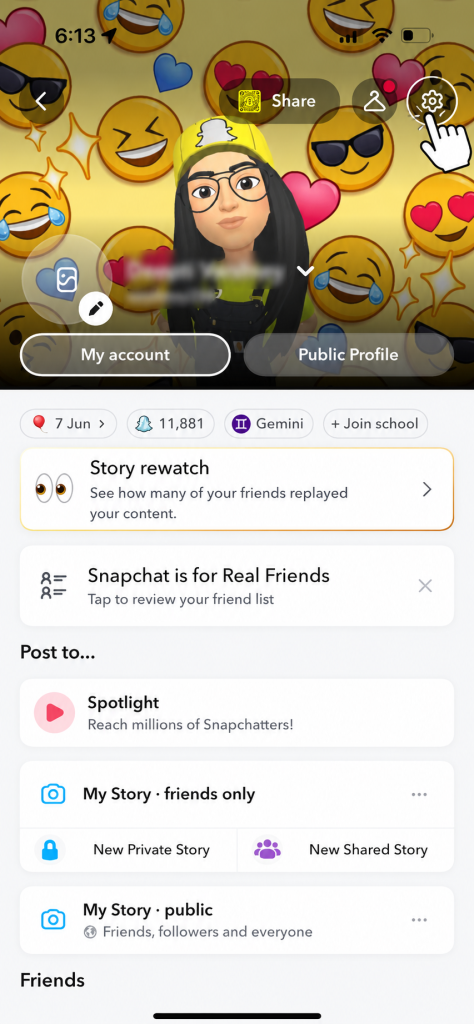
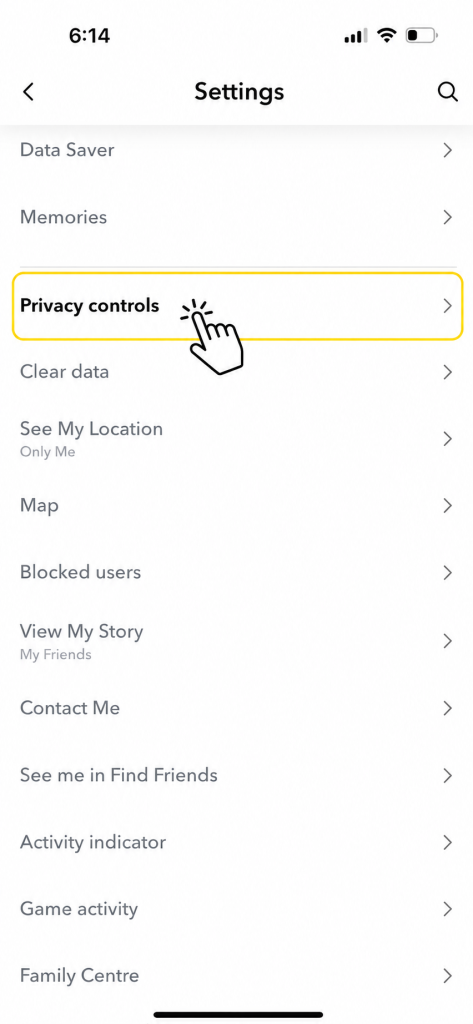
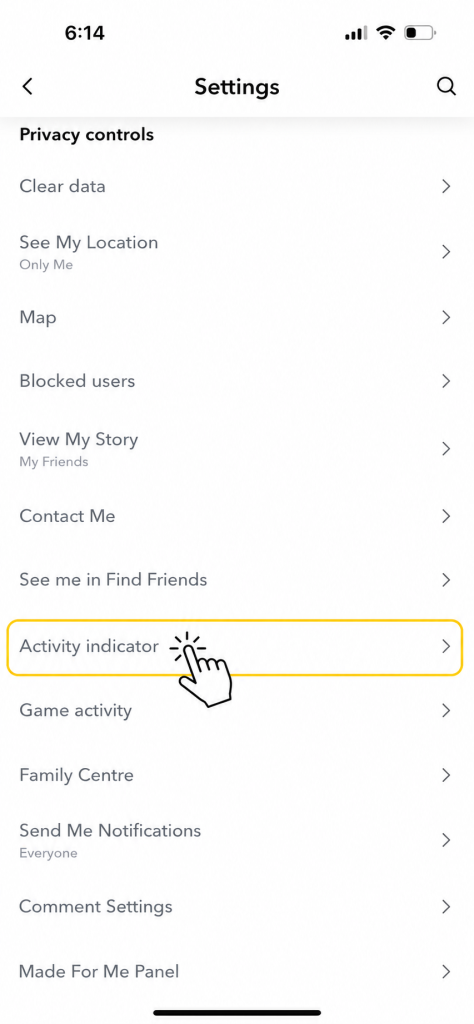
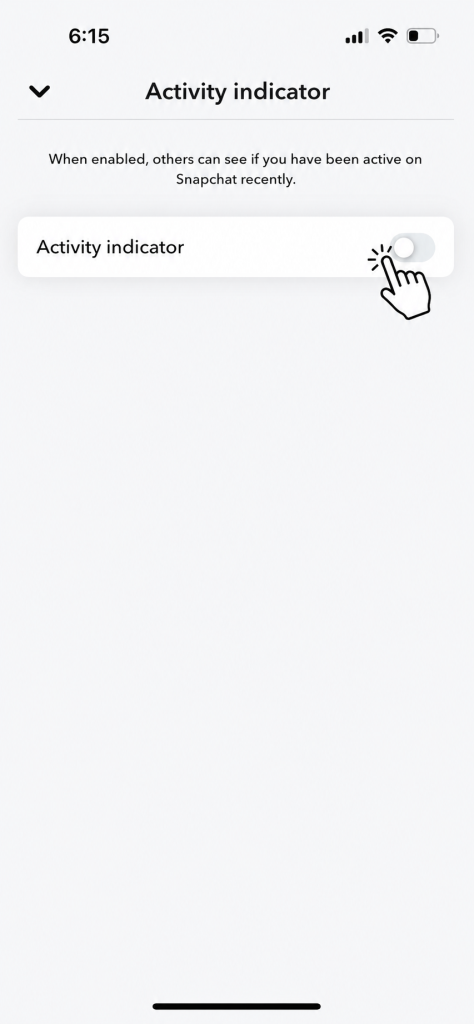
Once it’s off your friends won’t see a green dot next to your profile anymore. You also won’t be able to see theirs. Turning it off goes both ways.
What About the Other Coloured Dots on Snapchat?
While you’re here it’s worth knowing the green dot isn’t the only one. Snapchat uses a few different coloured indicators across the app and they all mean different things.
- Green dot:Recently active on Snapchat. The Activity Indicator.
- Yellow dot:New notifications waiting for you. Usually shows up as an alert for friend requests or suggestions.
- Blue dot:Unread message or unopened chat.
- Red or purple indicators:Related to unopened snaps or stories depending on the content type. Red for snaps without audio, purple for snaps with audio.
Frequently Asked Questions
Q – Does the green dot mean someone is ignoring me?
Not necessarily. The dot just means they were recently on Snapchat. They could be busy, in another conversation or just scrolling without responding to anyone. Don not read too much into it.
Q – How long does the green dot stay visible?
A few minutes after someone was last active. There is no official exact timeframe from Snapchat but it generally fades out fairly quickly after someone stops using the app.
Q – Can someone see my green dot if I haven not added them back?
No. The Activity Indicator is only visible to mutual friends. If someone hasn’t added you back or you haven’t added them your activity status stays private from them.
Q – If I turn off my Activity Indicator can I still see others?
No. Turning it off removes it from both sides. You won’t show a dot to your friends and you won’t be able to see their dots either. It’s an all or nothing setting.
Q – Does the green dot show on Snapchat Web too?
It primarily shows in the mobile app. The web version at web.snapchat.com has limited activity indicator functionality compared to the full mobile experience.
Final Thought
The green dot is a small feature but it genuinely confuses people because everyone assumes it means someone is actively on their phone right now. It doesn’t quite work that way. Recent activity, not live presence. And if the whole thing makes you uncomfortable just flip it off in Privacy Controls and that’s the end of it.