Someone pops up in your Quick Add and you want to know who you both know. Makes sense. But Snapchat is a bit stingy about mutual friend information compared to other platforms. Here is what you can actually find out and how to go about it.
What Snapchat Shows and What It Doesn’t
This is the bit worth knowing upfront before you go looking.
Snapchat will show you a mutual friend count. Something like 3 Mutual Friends sitting under someone’s name. That number is there. But the names behind it are not. Snapchat does not give you a list of who those people actually are.
So you will know you share connections with someone. You just will not know which specific friends are in common. That is how Snapchat has always handled it and it has not changed.
Method 1: Check the Quick Add Section
This is the most straightforward place to find mutual friend information on Snapchat.
-
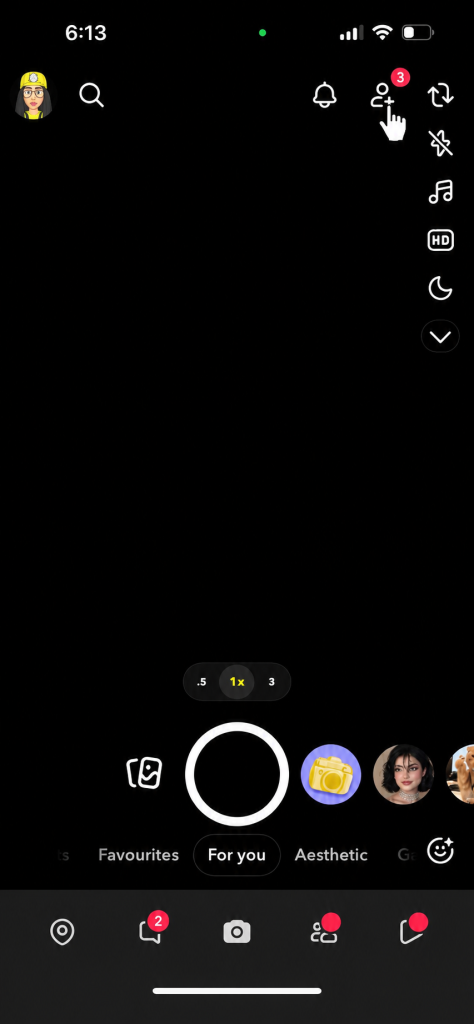
- Open Snapchat, Tap the Add Friends icon at the top right from your Chat screen.
- Look for the label under each username. If you share connections with someone it will say something like 7+ Mutual Friends or 10+ Mutual Friends below their name.

- Open Snapchat, Tap the Add Friends icon at the top right from your Chat screen.
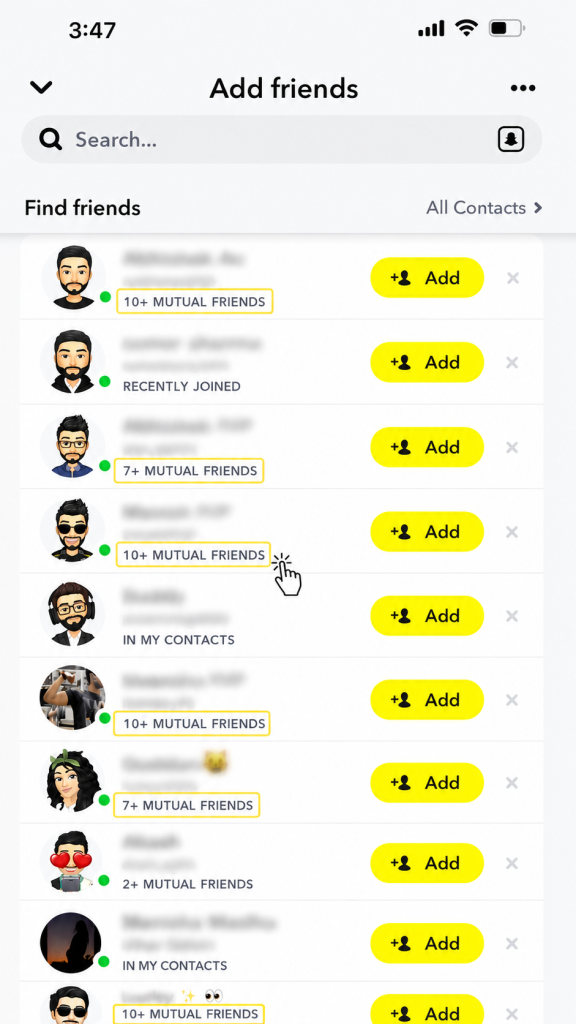
Again you will see the number only. Not the names. But it confirms there is an overlap between your friend list and theirs.
Method 2: Check During a Friend Request
When someone sends you a friend request or appears as a suggestion Snapchat sometimes shows the mutual friend count right there in the notification or request screen.
Open your pending friend requests and look under each name. If you share connections with that person the mutual friend label will appear without you needing to go anywhere else. Quick way to decide whether to accept or not.
Why You Can’t See the Actual Names
Snapchat keeps mutual friend details limited on purpose. The platform is built around privacy more than other social apps and showing a full list of who someone is friends with could expose connections people have not chosen to make public.
Facebook shows names because it is built around transparent social graphs. Snapchat is not. It gives you just enough to know a connection exists without revealing the full picture. That trade-off is unlikely to change given how the platform approaches user privacy generally.
What About Third Party Apps Claiming to Show Mutual Friends?
Skip them. Tools that claim to reveal full mutual friend lists on Snapchat are either not doing what they say or they are violating Snapchat’s terms of service. Some are outright scams that ask for your login details and then do nothing useful with them.
Snapchat does not provide an API that allows third party apps to pull this kind of data. So any tool claiming otherwise is either lying or doing something that puts your account at risk. Not worth it for information Snapchat has specifically chosen not to share.
Frequently Asked Questions
Q – Can you see the names of mutual friends on Snapchat?
No and this surprises a lot of people. You get a count, not a list. Snapchat will show you something like as an example – 5 Mutual Friends sitting under a person’s username but clicking on it does not reveal anything. The names stay hidden. It is just a number to let you know a connection exists.
Q – Why is the mutual friends count not showing on some profiles?
A few reasons. The person might have their privacy settings restricted so that mutual connection data is not visible. Or you may not share any friends with them at all so there is nothing to display.
Q – Does the mutual friend count update automatically?
Yes. If someone you both know gets added or removed from either friend list the count adjusts on its own. You do not need to refresh anything manually.
Q – Can someone see that I checked our mutual friends?
No. Browsing Quick Add or viewing someone’s profile does not notify them. They will not know you looked.
Q – Is there a way to see a full list of someone’s friends on Snapchat?
No. Snapchat does not make friends lists public. You can see your own list but not anyone else’s. Even mutual friend counts are limited to a number rather than individual names.
Bottom Line
Snapchat gives you just enough mutual friend information to be useful without going as far as showing you names. Check Quick Add for suggested accounts with mutual counts or open a profile directly to see what shows up there. That is genuinely as far as the app takes it. If the number matters more than the names then Snapchat has what you need. If you want to know exactly who the shared connections are you will need to ask the person directly.