The average successful short-form creator posts 5 to 7 videos per week across Snapchat, TikTok, Instagram Reels and YouTube Shorts. That is roughly 250 to 350 pieces of content per year on the low end. Considerably more for high-cadence creators. Each piece can vanish through platform expiry, accidental deletion, account issues or Community Guidelines takedowns.
Backing up all of it sounds overwhelming and mostly is not. A working backup system takes about 10 minutes weekly once set up and preserves the entire content archive across platforms indefinitely. This guide covers the specific approach creators use, why the platforms make it necessary and how to build a routine that scales as content volume grows.
Quick Answer
Short-form creators backup content by saving posts to their device before or immediately after posting. They use platform-specific in-app save options for TikTok and Instagram, plus browser-based downloaders for Snapchat where in-app saves are limited. The whole archive is then organised into folders by platform and month, backed up to cloud storage (iCloud, Google Drive or similar) and duplicated to external storage for critical content. The 3-2-1 rule adapted for creators: 3 copies, 2 different storage types, 1 off-site backup.
Why Short-Form Is a Specific Backup Problem
The mechanics of the format make preservation harder than for other content types.
- High volume, small individual files.Long-form YouTube videos are one big file. Short-form is many small files. The archive management challenge is different.
- Ephemeral by design on some platforms.Snapchat Stories, TikTok Stories and Instagram Stories all expire in 24 hours by design.
- Platform-specific recovery windows.TikTok’s 30-day Recently Deleted. Instagram Stories Archive if enabled. Nothing for Snapchat Stories.
- Format fragmentation.Same vertical 9:16 shape across platforms, but each platform re-encodes files with different bitrates and codecs. What TikTok stores is not identical to what Instagram stores.
- Metrics attached to platform copy.Views, likes and comments belong to the specific platform copy. Backup preserves the file but not the engagement history.
The Cross-Platform Landscape at a Glance
This table maps each major short-form surface to its backup profile.
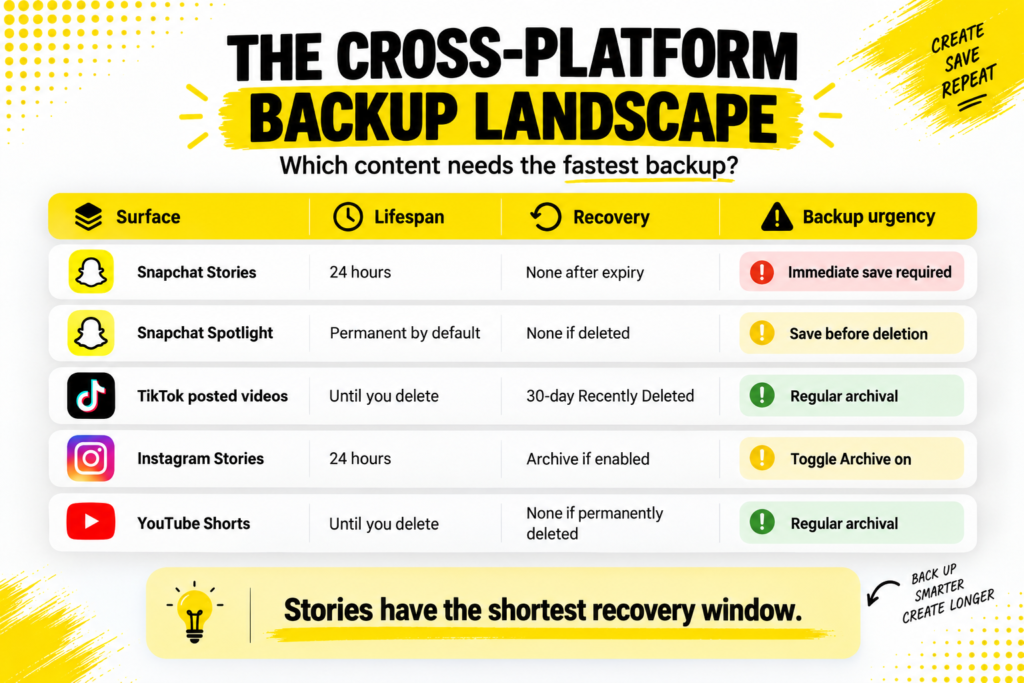
| Platform | Content lifespan | Recovery window | Backup urgency |
|---|---|---|---|
| Snapchat Stories | 24 hours | None after expiry | Immediate save required |
| Snapchat Spotlight | Permanent by default | None if deleted | Save before deletion |
| TikTok posted videos | Until you delete | 30-day Recently Deleted | Regular archival |
| TikTok Stories | 24 hours | Story Archive if auto-saved | Same-day save |
| Instagram Reels | Until you delete | None unless drafted | Regular archival |
| Instagram Stories | 24 hours | Archive if enabled | Toggle Archive on |
| YouTube Shorts | Until you delete | None if permanently deleted | Regular archival |
Snapchat Stories and Instagram Stories share the tightest deadline. Everything else offers some recovery breathing room, but nothing external substitutes for a proper local backup.
The Universal Backup Principles
Five principles work across platforms.
- Save at posting time.The moment a video is uploaded is the ideal moment for the backup. All platforms include or allow a save-to-device option during posting.
- Save with the highest available quality.Original source file if you still have it. Downloaded MP4 second choice. Screenshot or screen recording last.
- Save without platform watermarks.Watermarked files are limited use. Clean files can be reposted, remixed and used commercially without brand confusion.
- Organise by platform and month.A predictable folder structure makes retrieval fast six months later.
- Multiple backup locations.One location is not backup. Two is minimum. Three is professional practice.
The 3-2-1 Rule Adapted for Creators
The classic data backup rule works as-is for creators.
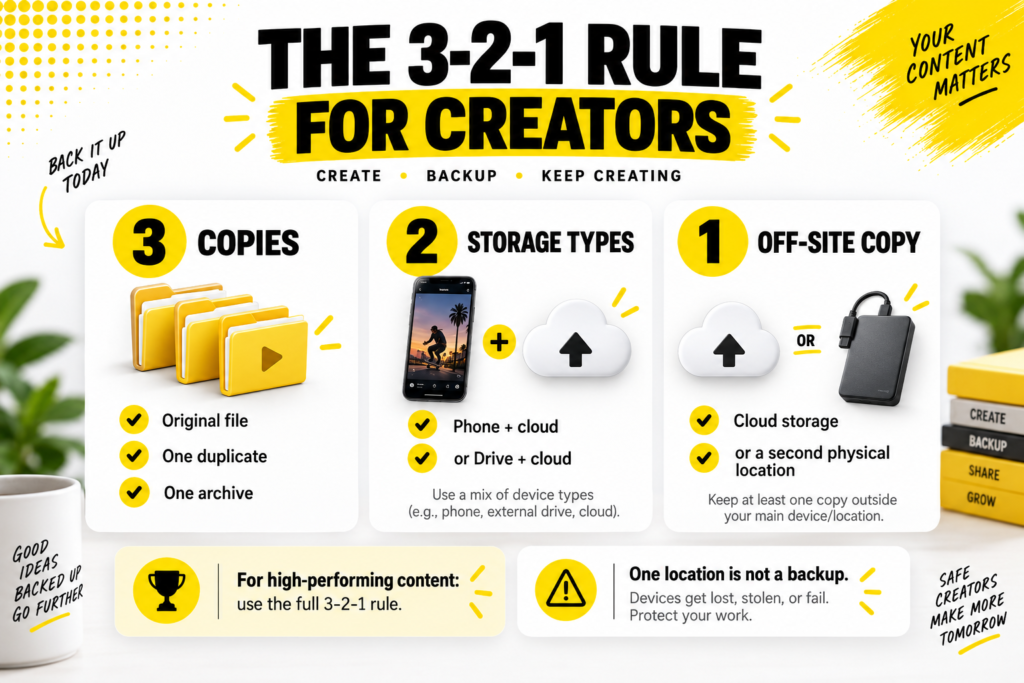
- 3 copies of every critical file.Original, one duplicate, one archive.
- 2 different storage types.Phone and cloud is one combination. External drive and cloud is another.
- 1 off-site copy.Cloud storage counts as off-site relative to your phone.
- For non-critical files.One good backup is fine. Cloud auto-sync from your phone camera roll usually covers this.
- For high-performing content.Full 3-2-1. That viral hit deserves a permanent archive strategy rather than a single-copy hope.
Platform-by-Platform Notes
Each platform has quirks worth knowing.
Snapchat.
Snapchat’sPublic Profile documentation explains that Public Profile Stories publish to open webpages. That public infrastructure is what makes browser tools possible. For Snapchat specifically, in-app Save is limited to the account owner and only during posting, so third-party downloaders fill a real gap.
ASnapchat Story Downloader saves public Story content cleanly as MP4 files. Useful both for archiving your own Stories after posting and for saving competitor content for research.
TikTok.
In-app Save Video works for posted content but adds a watermark. Browser tools return cleaner files. Drafts stay local-only and are the biggest single-loss risk when switching devices.
Instagram Reels and Stories.
Reels save option during posting works cleanly. Stories require the Archive toggle turned on in settings, which auto-saves Stories to a private archive after expiry.
YouTube Shorts.
YouTube Studio offers download of your own uploaded content. Original source files are the highest-quality backup route for creators who kept them.
The Folder Taxonomy That Scales
A specific folder structure that works for creators at any volume.
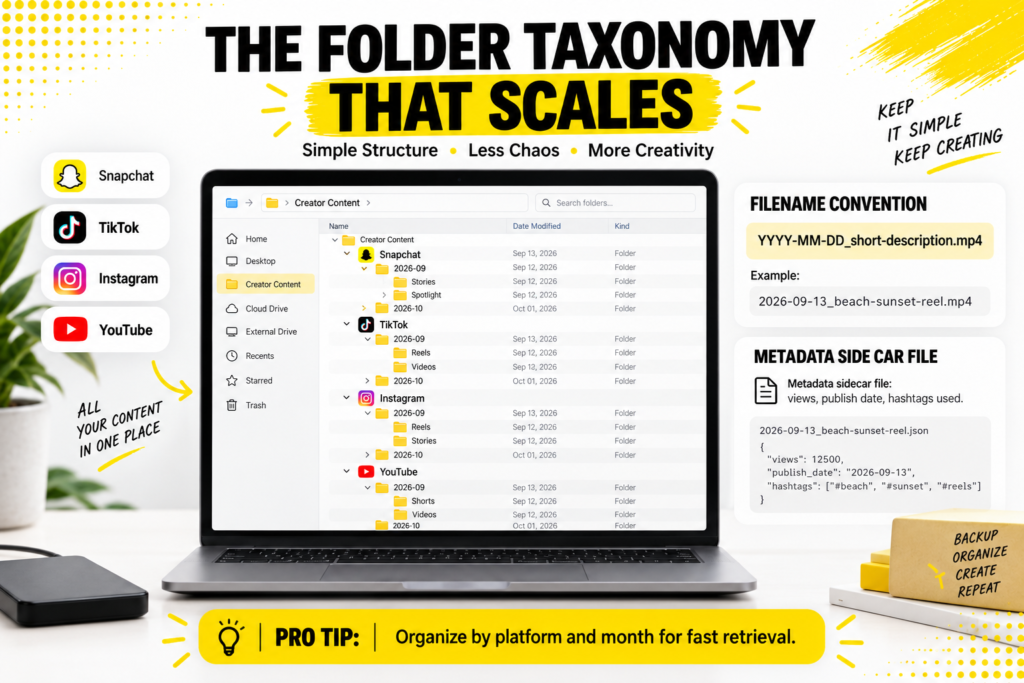
- Level 1: Platform.Snapchat, TikTok, Instagram, YouTube. Each gets its own top-level folder.
- Level 2: Year-Month.2026-01, 2026-02 and so on. Chronological organisation works better than topical because content evolves.
- Level 3: Content type (optional).Stories, Reels, Shorts, Videos as sub-folders if the platform has multiple types.
- Filename convention.YYYY-MM-DD_short-description.mp4. Sortable, searchable, self-documenting.
- Metadata sidecar files (optional).For high-performing content, a small text file with view counts, publish date and hashtags used preserves what the file itself cannot show.
This structure grows without breaking. A creator posting for five years has 60 monthly folders per platform, all findable in seconds.
The Weekly Backup Rhythm
The routine that keeps the archive current.
- Set a specific day and time. Sunday evening works for many creators.
- Open each platform in a browser or the app.
- Save any new content from the week that is not already in your archive.
- Check that the files landed in the correct folder for the current month.
- Verify cloud sync completed for the new additions.
- Note anything worth flagging in a running content log.
- Total time: 10 to 20 minutes for creators posting 5 to 10 items weekly.
- Consistency matters more than intensity. Weekly at the same time beats sporadic bulk sessions.
- Skipping a week is recoverable if you catch up the following week. Skipping a month starts creating real gaps.
Cloud Storage Options and Trade-Offs
The four categories creators actually use.
- iCloud Photos.Free tier is 5GB, which fills quickly with video. Paid tiers start around $1 monthly for 50GB. Deep iOS integration.
- Google Photos.15GB free shared with Google Drive and Gmail. Paid Google One starts at similar price points. Works across iOS and Android.
- Dropbox.Cross-platform, well-established, integrates with many tools. 2GB free tier is limiting.
- OneDrive.Bundled with Microsoft 365 subscriptions. Good for creators already using Word or Excel for tracking.
- Backblaze or dedicated backup services.Cheaper per terabyte for professional creators with large archives. Less convenient for daily access.
When Cross-Posting Becomes Natural Backup
An overlooked backup strategy: post the same content in multiple places.
- The same MP4 works on TikTok, Reels, Shorts and Spotlight.One save covers four platforms.
- If one platform deletes your account, the others still hold copies.Platform-level redundancy without extra effort.
- The engagement histories differ across platforms.Same file, different metrics. Sometimes a video underperforms on one platform and finds an audience on another.
- Cross-posting quality caveat.Each platform re-encodes uploaded files. Files stored across all four are not perfect copies but usable ones.
- Not a substitute for real backup.Platform copies are subject to platform decisions. Local copies are the real safety net.
For creators using Snapchat Spotlight specifically, Snapchat’s Spotlight documentation confirms the platform’s public-by-design nature, which pairs naturally with cross-platform distribution.
Long-Term Preservation Beyond Cloud
For content worth preserving beyond regular access windows.
- External hard drives.Physical redundancy. A single 2TB drive holds tens of thousands of short-form videos.
- SSD storage for frequently accessed archive.Faster than HDD but more expensive per terabyte.
- Archival cloud tiers.AWS Glacier, Google Cloud Coldline and Azure Cool Blob offer very cheap long-term storage for content rarely accessed.
- Physical media as tertiary backup.DVD or Blu-ray for absolute preservation of critical content. Rarely necessary but exists as an option.
- Multiple physical locations.One external drive at home and one at another location protects against fire, flood or theft.
The Analytics Preservation Question
Files preserve the content. Metrics require a different approach. Snapchat’sPublic Profile features documentation mentions Insights, the built-in analytics dashboard for creator accounts. Similar dashboards exist for TikTok Studio, Instagram Insights and YouTube Studio.
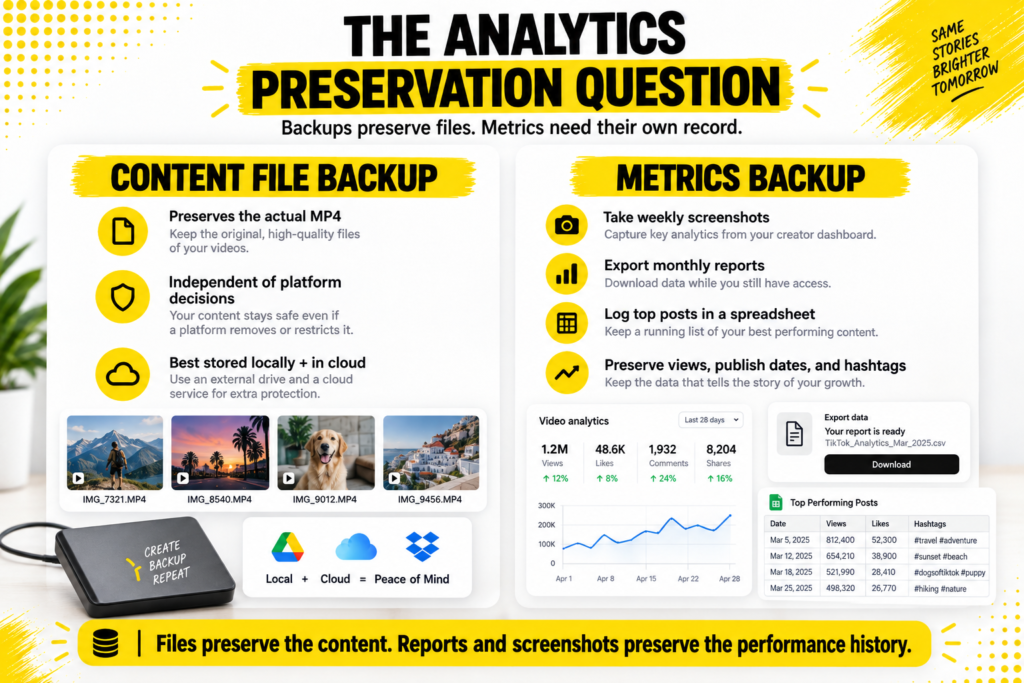
- Take weekly screenshots of key metrics for high-performing content.
- Export monthly reports where the platform allows it.
- Note top posts in a running spreadsheet with view counts and publish dates.
- The platforms may reset or change how metrics are displayed over time. Snapshots preserve what current interfaces would not show later.
- For business creators, this becomes essential documentation for taxes, partnerships and case studies.
Common Backup Mistakes Creators Make
Seven patterns that undo backup efforts.
- Assuming platforms are backups.Platforms delete accounts, change terms, remove content. Nothing on any platform is guaranteed permanent.
- Not verifying saves landed.The save button was tapped, but the file may or may not have actually saved. Verification is the fastest way to catch failures.
- Relying only on phone storage.Phone loss, damage or theft ends the archive. Cloud sync is essential.
- Ignoring drafts.Drafts on any platform are usually device-only. Losing the device loses the drafts.
- No file organisation.A single “TikTok saves” folder with 3,000 files is technically a backup but functionally unusable.
- Skipping the metadata.Six months later, you may need to know when a specific video was posted or what its performance was. Preserving that context is part of backup.
- Backing up only the winners.The videos that seemed unimportant sometimes become the most needed. Comprehensive backup avoids retrospective regret.
When Content Volume Exceeds Manual Backup Capacity
For creators past a certain volume, automation becomes essential.
- At 20 to 50 posts weekly.Manual backup takes 30 to 60 minutes weekly. Still manageable.
- At 50 to 100 posts weekly.Consider partial automation through scheduling tools that also archive.
- At 100+ posts weekly.Agency territory. Purpose-built content management platforms like Archive or dedicated creator tools handle the volume.
- Team accounts.Multiple creators posting through one account need standardised backup practices to avoid gaps.
- Multi-account creators.Managing three or four separate accounts across platforms scales manual backup complexity quickly. Consolidated dashboards help.
Cross-Device Access to the Archive
One quiet advantage of cloud-based backup: access from anywhere.
- Save on phone, edit on laptop, present from tablet.
- Show clients specific past content in real time during meetings.
- Pull archived content for repurposing without needing the original device.
- Recovery from device loss becomes routine rather than catastrophic.
- Team collaboration becomes possible without physical file transfer.
The archive is not just insurance. It is a working resource that a well-organised creator uses regularly.
Backup FAQs
Do I really need to backup content that is already on the platform?
Yes. Platforms delete content, ban accounts, remove videos and change policies. Anything you value belongs in local storage independent of the platform holding it.
How much cloud storage do I actually need?
For most creators, 50GB to 200GB covers a full year of short-form archive. Heavy creators may need 500GB to 1TB. Video files are around 5 to 50MB each for short-form.
Can I use free cloud storage tiers?
For the first few months yes. Most creators quickly exceed free tiers and end up on paid plans within 6 to 12 months.
What is the biggest single risk to my archive?
Having only one copy. Whether that copy is on a phone, a laptop or a single cloud service, redundancy is what protects against loss.
One Routine, Many Platforms, One Complete Archive
Backing up short-form content across multiple platforms sounds like a big undertaking and mostly is not. The weekly routine is short. The tools are familiar. The archive grows one week at a time into something that captures years of work in a form no platform can take away.
The creators who invest in this habit rarely lose content to platform incidents. The ones who skip it eventually pay a specific price for the skip. Ten minutes weekly against years of work preserved is a bet with only one obvious answer. What the platforms decide about your content stops being your problem when you already have your own copies of everything worth keeping.