
Pinned someone by accident and now every time you open chats it’s just sitting there? Or things just changed and that person does not need to be front and centre anymore. Good news is getting rid of a pinned chat takes maybe five seconds and the other person genuinely has no idea it happened.
First, a Bit of Context on Pinning
When you pin a chat on Snapchat it gets locked to the top of your conversation list. Doesn’t matter when the last message was sent. It stays up there.
You can only have three pinned conversations at once. That’s just how Snapchat built it. So if you’re at three and want to add someone new, one of the existing three has to go first.
And here’s the thing most people worry about: pinning and unpinning are both invisible to the other person. No notification, no hint, nothing. It’s just a visual organisation thing on your own screen.
Steps to Unpin Someone
Works the same on iPhone and Android.
- Open Snapchat and head to the Chat tab.
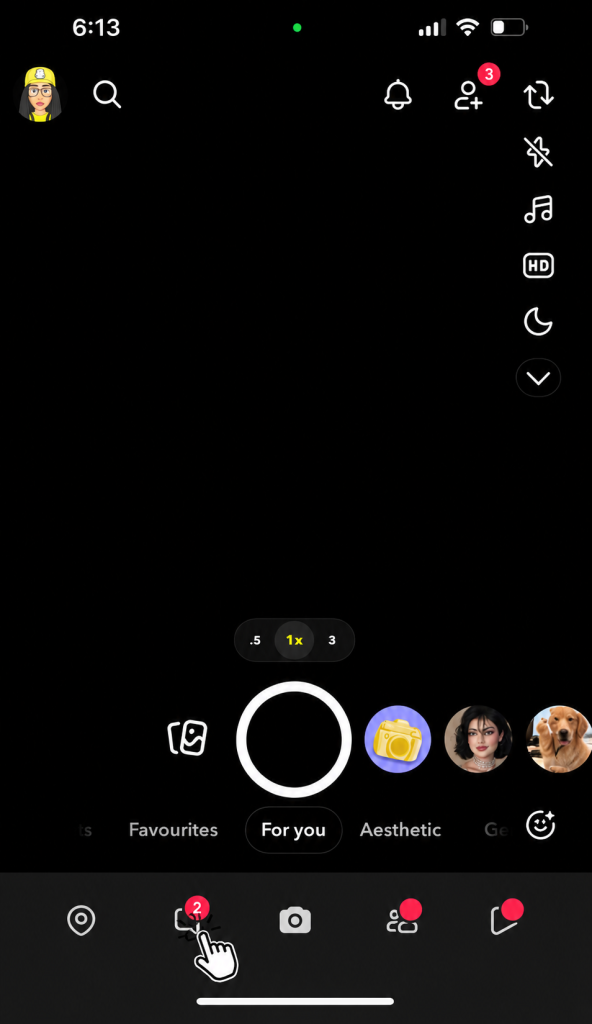
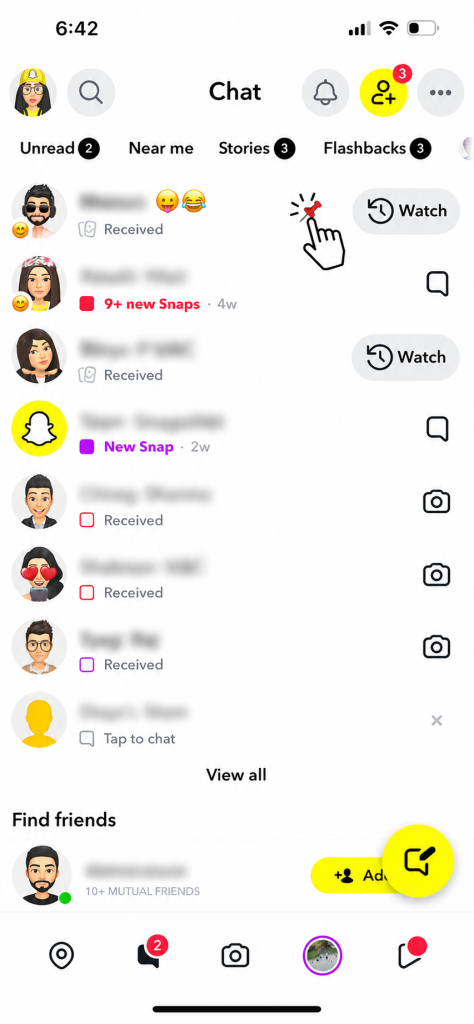
- Look at the top of your chat list. Pinned conversations sit there with a little pin icon next to them.

- Press and hold on the one you want to unpin. Hold for a full second until the menu shows up.
- Tap Chat Settings.
- Hit Unpin Conversation.
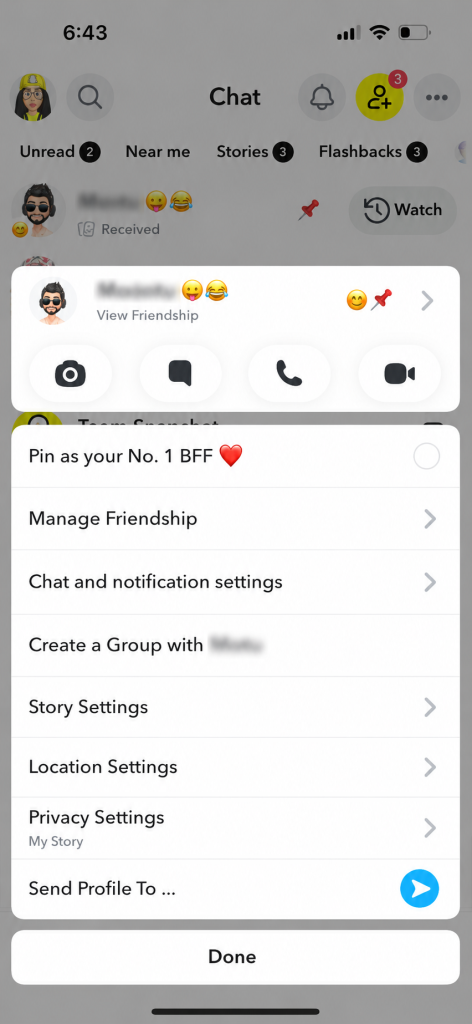
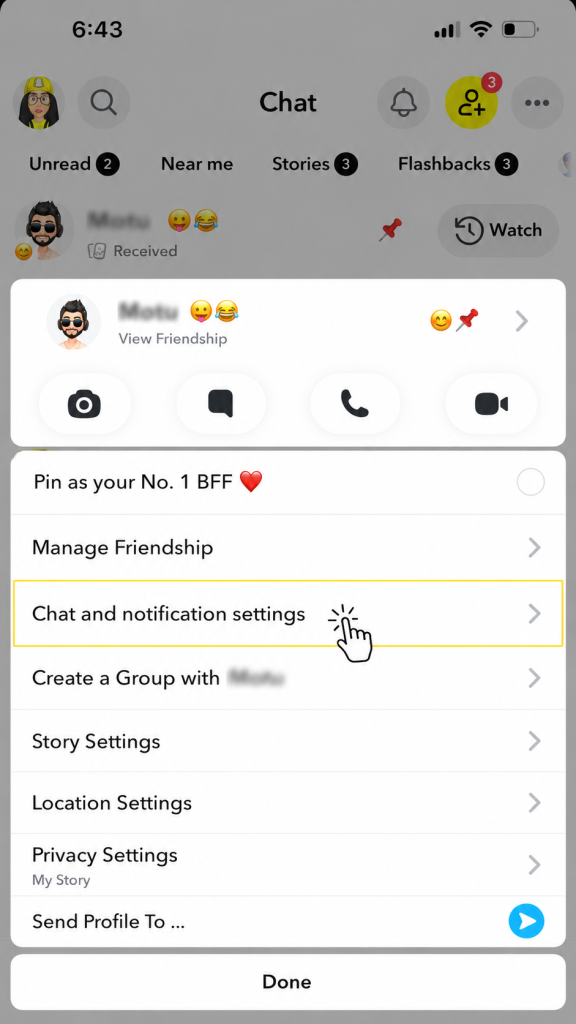
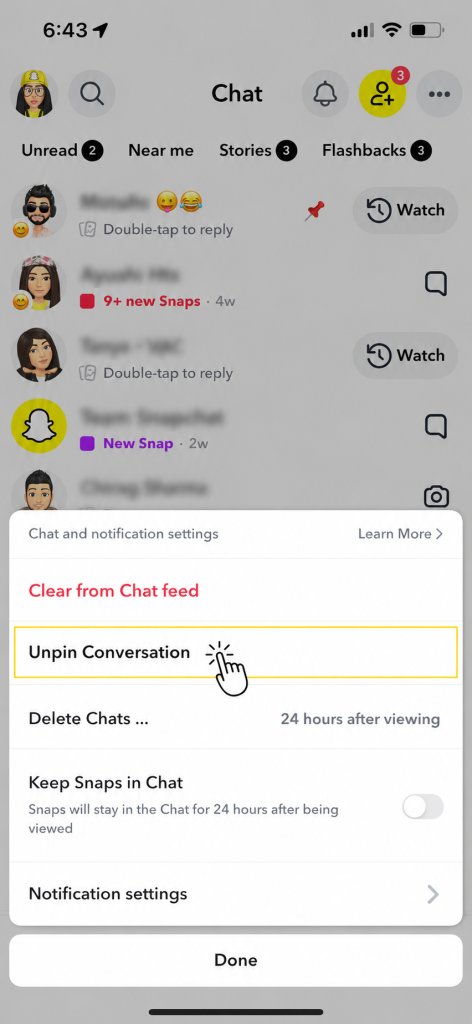
That’s genuinely it. No confirmation popup, no second step. The chat just slides back down into the regular list where it belongs based on when you last messaged.
Will They Know?
Nope. Pinning a chat is entirely a you thing. It only changes what you see on your own screen. Nothing gets sent to the other person, no activity shows up on their end and Snapchat doesn’t log it anywhere they’d see.
Genuinely nothing to worry about here. Unpin freely.
What If You Can’t Find the Unpin Option?
Occasionally the menu looks a bit different or the option seems to be missing. Usually one of these four things is causing it.
- Your app is out of date:Outdated Snapchat versions sometimes show different menus. Go update it and try again.
- You’re not holding long enough:The long press needs about a second before the menu triggers. Try holding it a bit longer than you normally would.
- That chat might not actually be pinned:Check for the pin icon. If it’s not there the conversation isn’t pinned in the first place.
- Close and reopen the app:A quick restart sorts out most weird display issues on Snapchat.
Pinning Someone Again
Unpinned the wrong person or just changed your mind? Same process as before but in reverse.
- Go to the Chat screen.
- Long press the conversation.
- Tap Chat Settings.
- Select Pin Conversation.
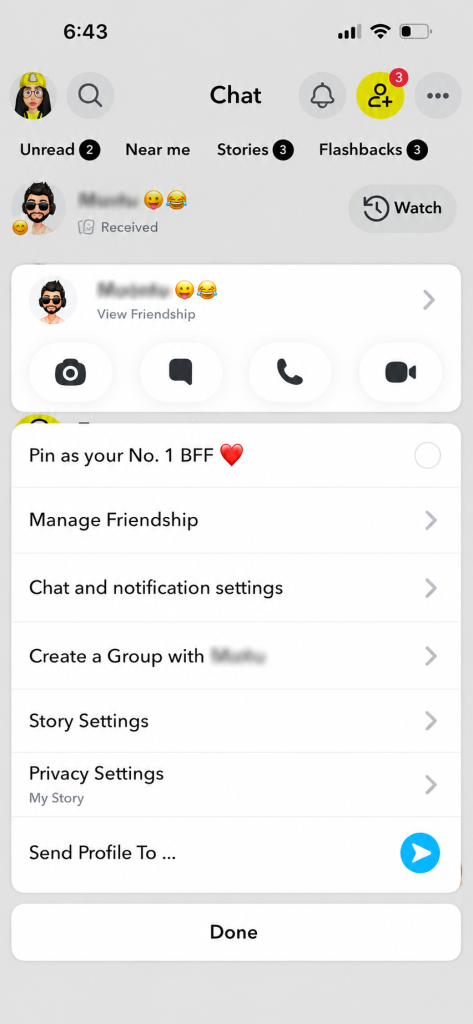
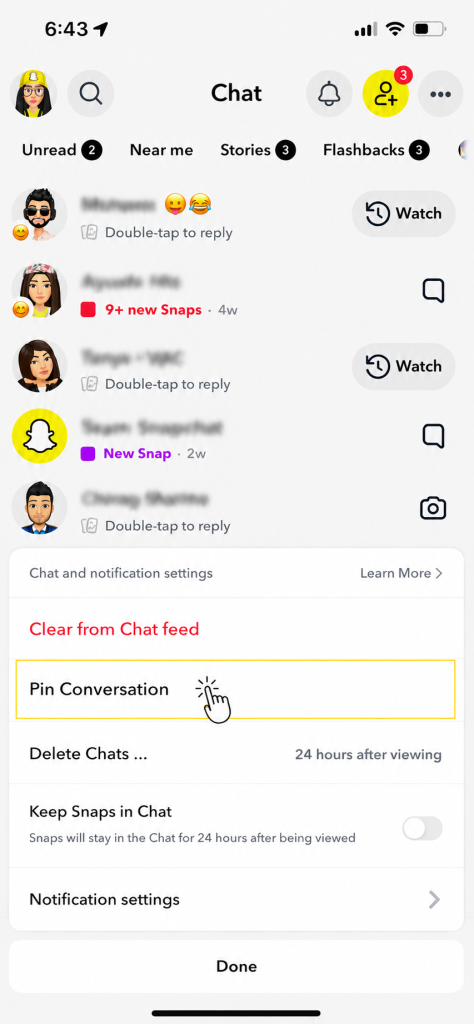
If Pin Conversation isn’t showing up you’re probably already at three pinned chats. Unpin one and the option comes back.
Some Practical Tips on Managing Pins
Pinning three contacts and never touching it again is a bit of a waste. A few things worth keeping in mind.
- Only pin people you’re actively messaging:If you haven’t sent them anything in a week or two the pin is just clutter at this point.
- Group chats work really well as temporary pins:Got something being planned with a group? Pin it for now. Unpin once the event or project is done.
- Swap them out as things change:Who you chat with most changes over time. Your pinned list should probably reflect that.
- Three is the cap, full stop:If pinning a fourth isn’t working that limit is why. No way around it currently.
Frequently Asked Questions
Q – Does unpinning remove them as a friend?
Not at all. Unpinning is purely about how your chat list looks. Friendship, messages, streaks, all of it stays completely untouched.
Q – Is three really the maximum pins on Snapchat?
Yeah, three. Always has been. No setting to increase it. If you need a fourth you have to drop one of the current three first.
Q – Do my old messages disappear when I unpin?
No chance. Your conversation history stays exactly where it is. The chat just moves from the top of the list back to its normal position based on when you last sent something.
Q – Can you unpin from Snapchat on a computer?
The pinning feature lives in the mobile app. Snapchat Web has limited support for it so if it’s not showing up on the browser version just use your phone instead.
Q – Does my streak with that person get affected?
Zero effect. Streaks run entirely off whether you’re sending snaps back and forth daily. Pinning or unpinning a chat has nothing to do with that.
That’s Really All There Is to It
Long press the chat, go to Chat Settings, tap Unpin Conversation. The whole thing takes about five seconds and leaves absolutely no trace. And if you ever want to pin them again the same three taps brings it back.