Leah posts on Snapchat almost daily, but for months she couldn’t figure out where a clip should go. Story? Spotlight? Both, just in case? She kept uploading the same video to each one, then scratching her head over why one version barely got noticed while the other took off. This is a hypothetical example, but it points at something real. The two features barely work the same way. Different rules, different audiences, different everything really. Post to the wrong one and a genuinely good clip can just sit there with nobody watching.
What Story Is Actually For
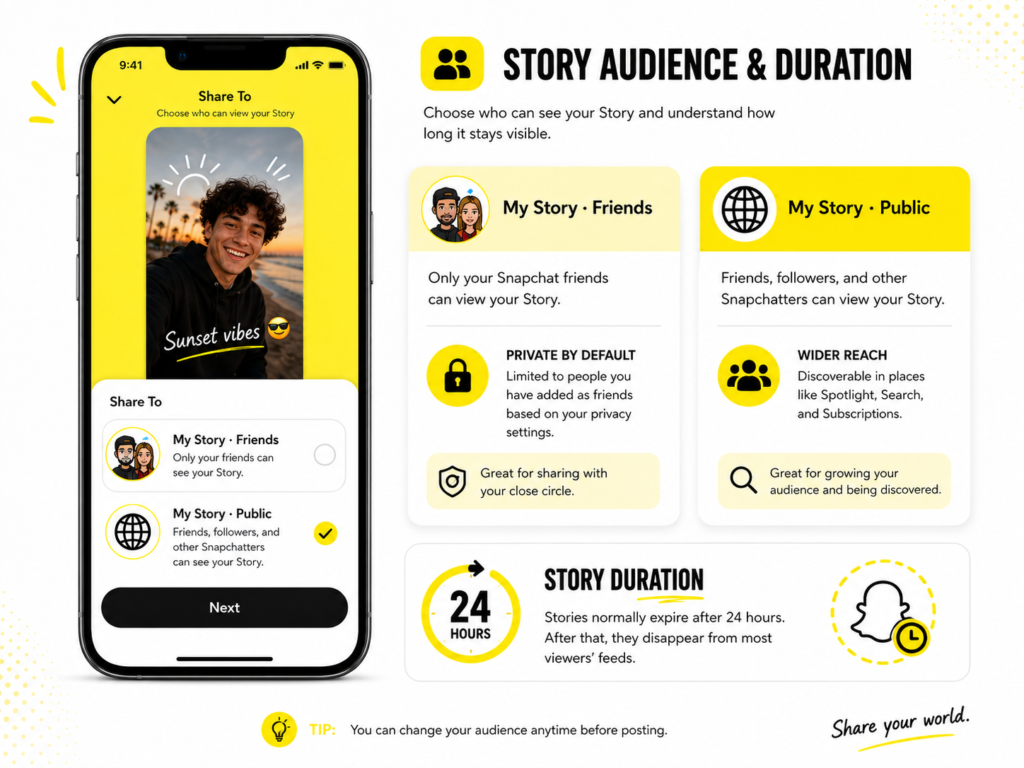
A Friends-only Story sticks to whoever already follows you. It sits near the top of their feed, hangs around for about a day, then it’s gone unless you save it to Memories.
A Public Story works differently though. It can reach friends, followers and other Snapchatters too, not just the people who already follow you, according to Snapchat’s own breakdown ofwho can see your Story.
- A Friends-only Story is mostly shown to whoever your privacy settings allow
- A Public Story can be seen by followers plus other Snapchatters browsing around
- Normally gone after 24 hours, though saved content and Memories change that
- Story leans on the audience you already have rather than pulling in new viewers
- Works best for daily updates and behind the scenes clips
What Spotlight Actually Does
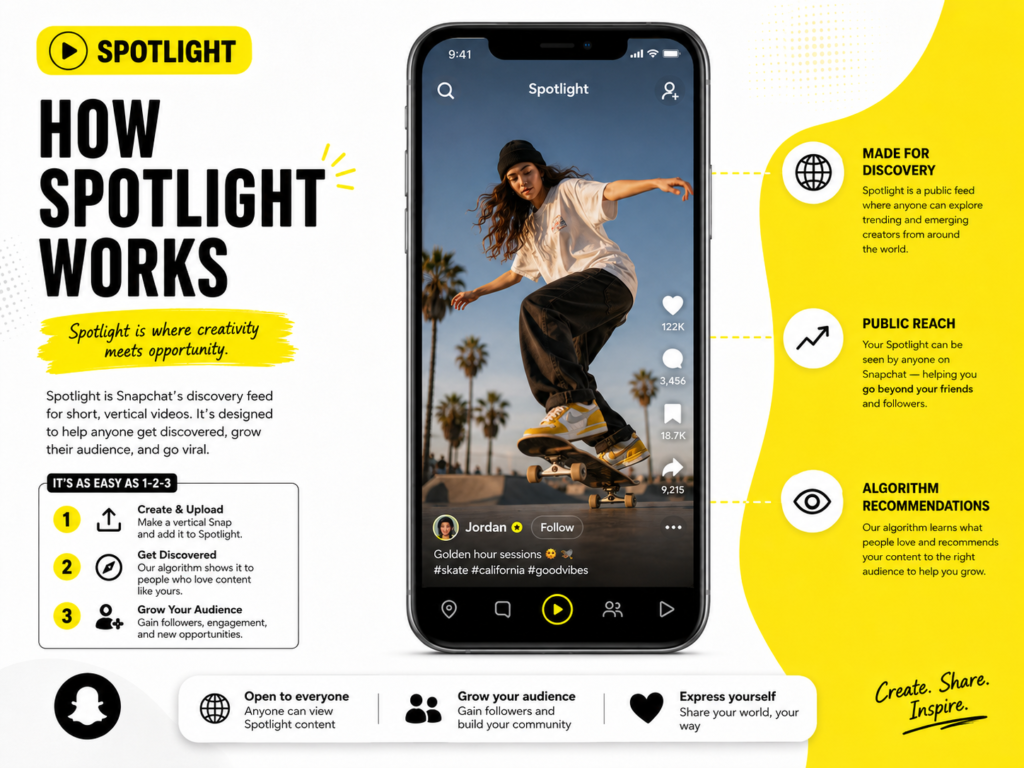
Spotlight works nothing like Story. Think of it as Snapchat’s version of a short form discovery feed, kind of like TikTok’s For You page, built to surface clips no matter who follows who.
Snapchat hasn’t published its exact ranking formula, but it does explain plenty about what goes into it. How Snapchat ranks Spotlight content looks at watch time, completion, favorites, shares, comments, subscriptions and how similar viewers reacted before. A single clip can genuinely land in front of thousands of total strangers who’ve never heard of the account posting it, though creator information and past engagement still play some role.
- Can reach people well outside your follower list, though it’s never guaranteed
- Not limited to a 24-hour window, but nothing says it stays up forever either
- Leans heavily on the video itself, though other signals matter too
- Eligible creators invited into Snapchat’s Monetization Program may earn revenue from qualifying Spotlight videos, replacing the older Spotlight Rewards Program that ended back in January 2025
Why Leah’s Numbers Finally Made Sense
Here’s a hypothetical that shows the gap clearly. Say Leah posts a skincare routine clip. Her regulars have watched some version of that same routine more times than they can count, so a modest handful of views on Story would make total sense.
Posted to Spotlight instead, that same clip could reach a much wider audience within days. Total strangers discovering it, with the algorithm feeding it to more of them as long as the engagement holds up.
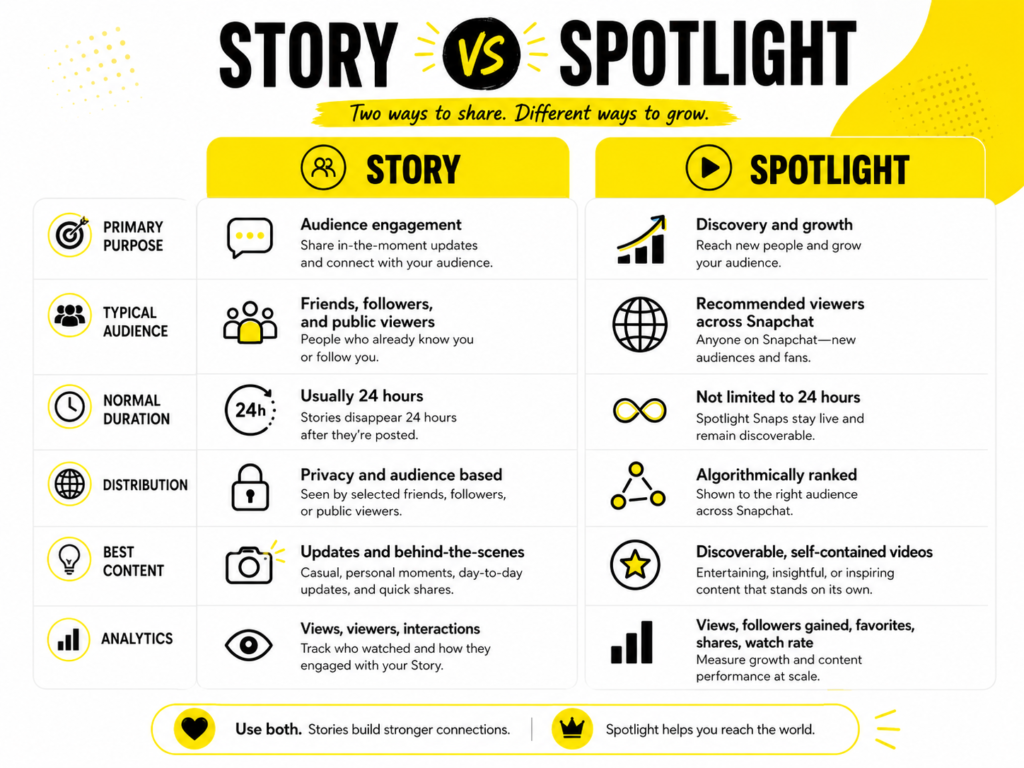
That gap says a lot. Spotlight can reach viewers well beyond your existing audience, though follower relationships and creator signals may still nudge things one way or another. Story leans almost entirely on the people already following you.
How to Decide Where to Post
Nobody has to commit to one feature for good. What actually matters is reading each piece of content and figuring out where it belongs.
- Personal update or an inside joke for regulars? Post it to Story.
- Something that could land with total strangers? Try Spotlight first.
- Trying to grow your following? Spotlight is built for that.
- Trying to keep current followers engaged daily? Story does that job better.
Saving a Clip Once It Takes Off
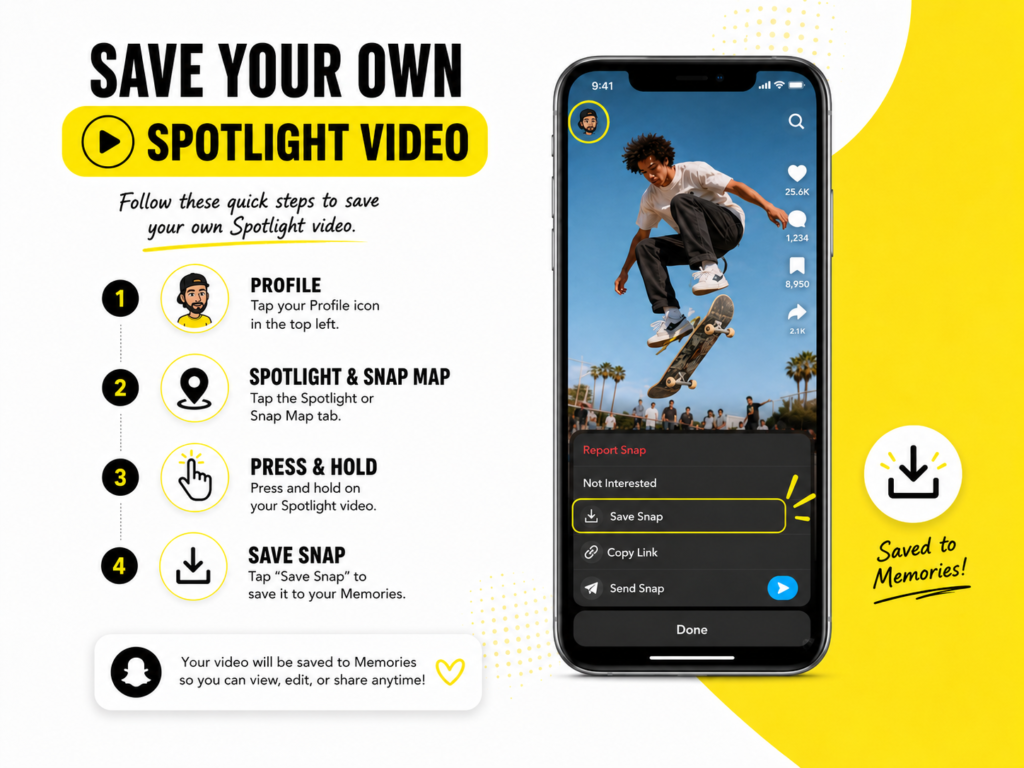
Once a Spotlight video starts pulling real numbers, most creators want a saved copy for a portfolio, a highlight reel or just as a backup in case it gets taken down later.
For your own posts, Snapchat actually has a built in option most people miss. Open your profile, head to Spotlight and Snap Map, press and hold your post and pickSave Snap. That’s the official route worth using before anything else.
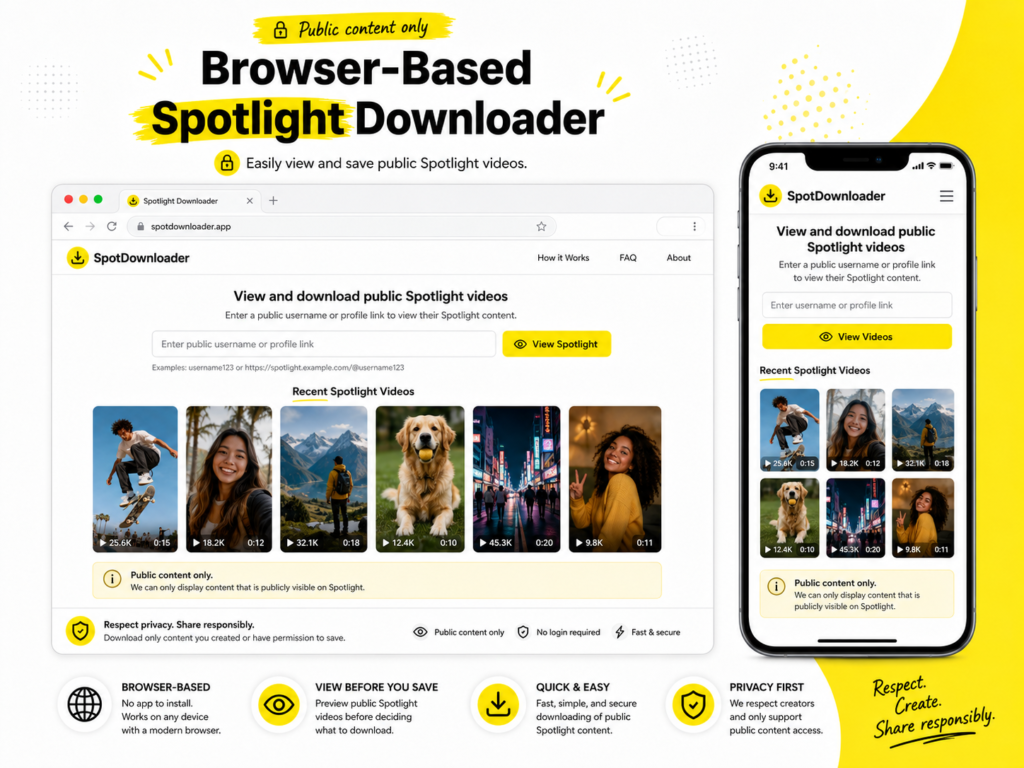
For a public clip you don’t own and want to revisit through a browser or another device, aSnapchat Spotlight Downloaderbeats screen recording, which can lose quality or pick up interface clutter depending on the device. Paste in the public profile link and browse whatever Spotlight videos are available there. Only save or reuse videos you made yourself or have permission to use since public availability doesn’t automatically mean you’re free to republish someone else’s content.
Testing Both Before Committing
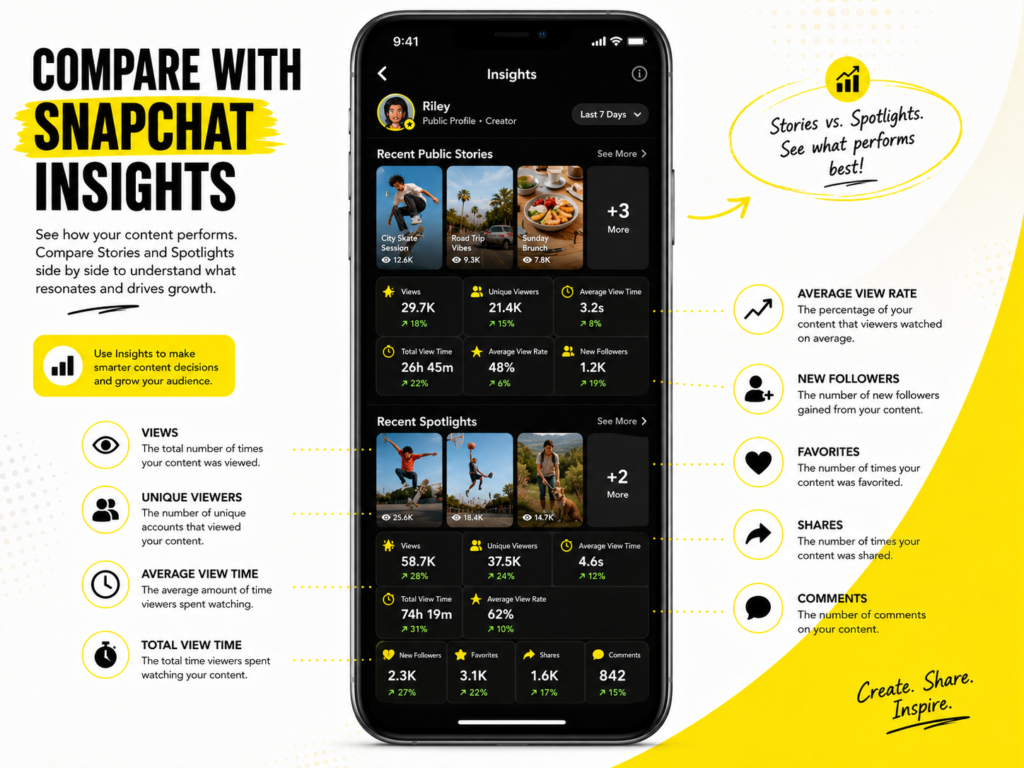
Leah’s advice to newer creators is blunt: stop guessing. Post the same type of content to Story for a week and Spotlight for a week, then actually compare the numbers usingSnapchat Insights instead of just eyeballing it.
Some formats do better with an existing audience. Others take off with strangers who found it cold. Short of testing both, there’s really no way to guess correctly.
One habit that helps, at least anecdotally: don’t judge a clip after 48 minutes, judge it after 48 hours or so. Spotlight especially needs some time before the algorithm has a real read on how far to push it.
Content That Fits Each Feature Better
Not every clip belongs on both. Leah started sorting her ideas before filming instead of deciding afterward. It saved her a lot of wasted uploads.
A few patterns hold up across most creator accounts, not just hers:
- Tutorials and how-to clips tend to travel well on Spotlight
- Inside jokes or callbacks only regulars will get belong on Story
- High energy, short hooks perform better with strangers on Spotlight
- Casual, unpolished updates keep an existing audience engaged on Story
None of these rules are fixed. They just save you from guessing cold every time you sit down to post.
None of these rules are fixed. They just save you from guessing cold every time you sit down to post.
Frequently Asked Questions
Is it fine to post the same video on Story and Spotlight?
Yes. Posting to both isn’t against the rules, though every Spotlight submission still needs to meet Snapchat’sSpotlight Guidelines and performance on each will look completely different.
Does Spotlight replace Story for creators?
No. Most serious creators use both, they just don’t use them for the same reason.
Does Spotlight require a big following to do well?
Not really. A big following isn’t required, though creator information and past engagement can still factor in somewhat. A brand new account can still land something big if the video holds up.
Why did my Story only get a handful of views?
Story mostly reaches your existing audience. If they’ve already seen similar content, the view count will reflect that.
Is there a way to save a Spotlight video without screen recording?
Yes. For your own Spotlight post, Snapchat’s built in Save Snap option is the official way to go. For a public clip you don’t own, a Spotlight downloader tool can pull it from the public profile instead.
Where This Leaves Creators
Story and Spotlight solve two different problems. Treating them like the same feature is what trips most creators up early on.
Post the personal, daily stuff to Story. Save the polished, reach-worthy clips for Spotlight, use the official Save Snap option for your own posts first and lean on a Snapchat Spotlight Downloader for public clips you want backed up before they disappear from view.